Poll questions are now available in Castify Quizzes. Let viewers select multiple answers to gather feedback, check understanding, and boost engagement alongside existing multiple choice and short answer questions.
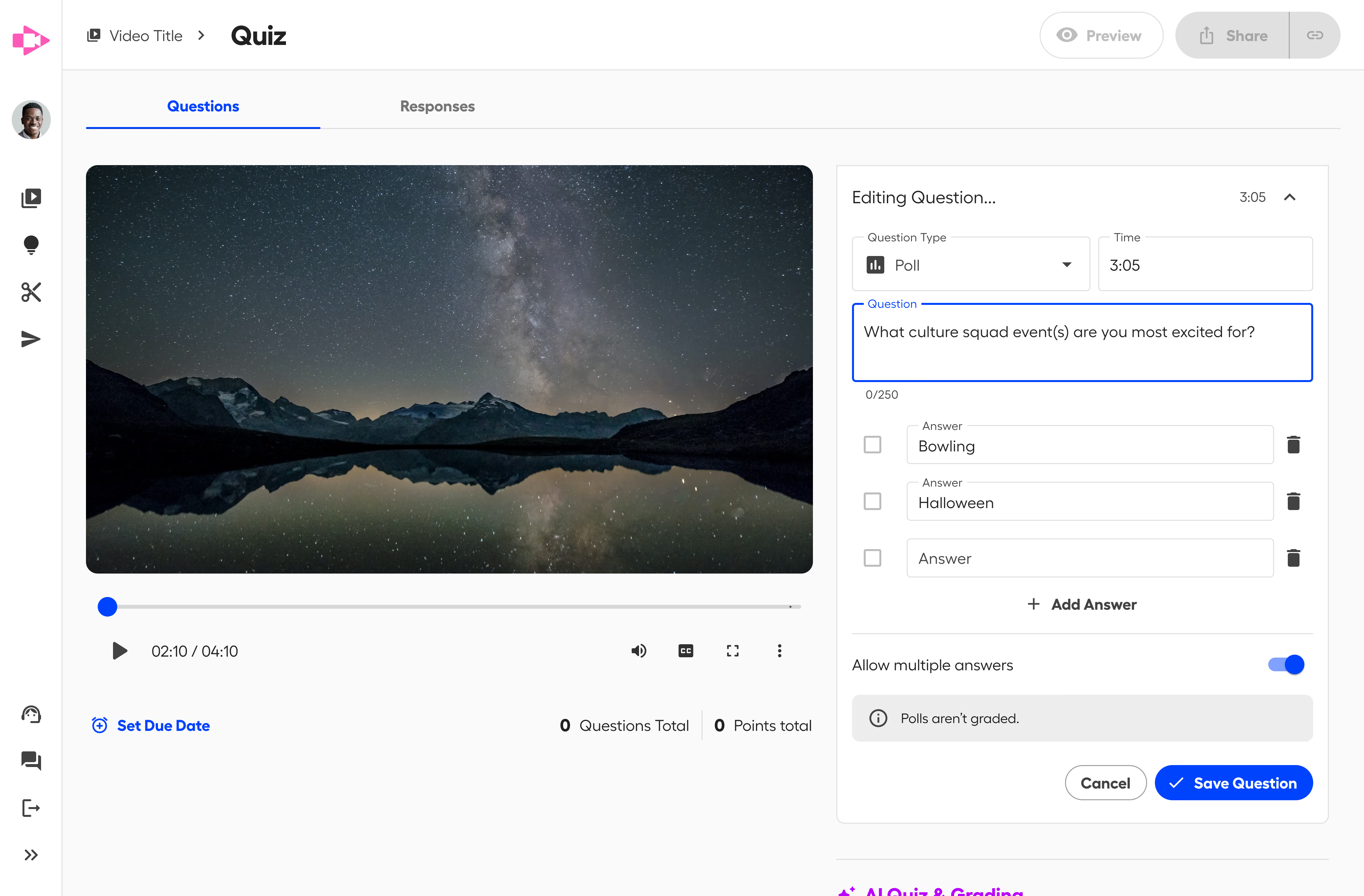
We’re excited to introduce poll questions, a new question type designed to make your videos more interactive and informative. Poll questions allow viewers to select multiple answers, making them ideal for moments when understanding, feedback, or perspective matters more than a single correct response.
Polls give you more flexibility in how you engage your audience and interpret responses, especially when topics are nuanced or open-ended.
How Poll Questions Can Be Used
Adding a poll is simple: choose the “Poll” question type, enter your question, and provide multiple options. Participants can then select all answers that apply, giving you more nuanced responses than a standard single-answer format.
To add a poll question, simply select the Poll question type, write your prompt, and provide multiple answer options. Viewers can then choose all responses that apply.
Poll questions unlock a range of use cases beyond traditional assessment, including:
Collect feedback or opinions: Ask your audience which topics they find most interesting or relevant.
Check comprehension across multiple concepts: Identify all the areas your learners have grasped.
Encourage brainstorming or idea sharing: Let participants highlight all solutions or ideas they consider valid.
Increase engagement during lessons or presentations: Polls can spark discussions and keep viewers active.
Other Ways to Ask Questions in Castify Quizzes
In addition to polls, Castify Quizzes supports other question types that serve different goals.
Multiple Choice Questions
Multiple choice questions are ideal when you need a focused way to measure understanding or reinforce key points. They work especially well for:
Knowledge checks: Confirm whether viewers understand specific concepts or facts.
Skill reinforcement: Reinforce learning by asking viewers to apply what was just explained.
Formative assessment: Quickly identify gaps in understanding before moving on.
Consistent evaluation: Use standardized answer choices to track patterns across responses.
To save time, you can also use AI-powered question suggestions to generate multiple choice questions based on your video content. This helps you create aligned, relevant questions faster without starting from scratch and can even inspire ideas for poll prompts or follow-up questions.
Short Answer Questions
Short answer questions give participants the freedom to type their own responses. This type is ideal for:
Open-ended reflections: Encourage learners to explain concepts in their own words.
Problem-solving exercises: Allow participants to show their reasoning process.
Discussion prompts: Spark conversation around complex ideas or topics.
Short answer questions complement multiple choice and poll questions by providing a space for more nuanced responses that can’t be captured in pre-set options.
Start Using Polls Today!
Poll questions add a new layer of flexibility to Screencastify Quizzes, making it easier to collect feedback, check understanding, and keep viewers engaged. Alongside multiple choice and short answer questions, you now have more ways to ask the right question at the right moment in your video.
Related Blog
Student Engagement & Assessment
July 6, 2026
New Submit AI Enhancements: Flexibility, Targeted Instruction and Audio Only

.avif)
.avif)





