A smarter Loom alternative, built for work
See why teams switch from Loom to Castify. Collect video updates, get feedback with due dates, and turn any recording into an SOP or guide.





Logos shown are trademarks of their respective owners and represent organizations whose teams use Castify. Display does not imply endorsement.
Is Castify a good Loom alternative?
Yes. Castify does what most teams use Loom for: record your screen and camera, then share by link. It also adds three things Loom doesn’t offer:
Castify Submit collects video responses from one link, with due dates and reviewers.
AI voiceovers in 90+ languages, plus captions translated into 50+.
Castify Transform turns any recording into an SOP or step-by-step guide.
In summary: choose Loom for quick one-way messages. Choose Castify when a video needs to drive action, like training, SOPs, and team updates.
Can Castify turn a video into an SOP or guide?
Yes. Castify Transform turns a screen recording into a how-to guide, SOP, or bug report in seconds. Your team can follow the steps without rewatching. Loom stops at the video.
Record once, document instantly. Walk through a process and get a step-by-step document back.
Screenshots and timestamps built in. Every step links to the right moment.
The doc you need. How-to guides, bug reports, training materials, or custom types.
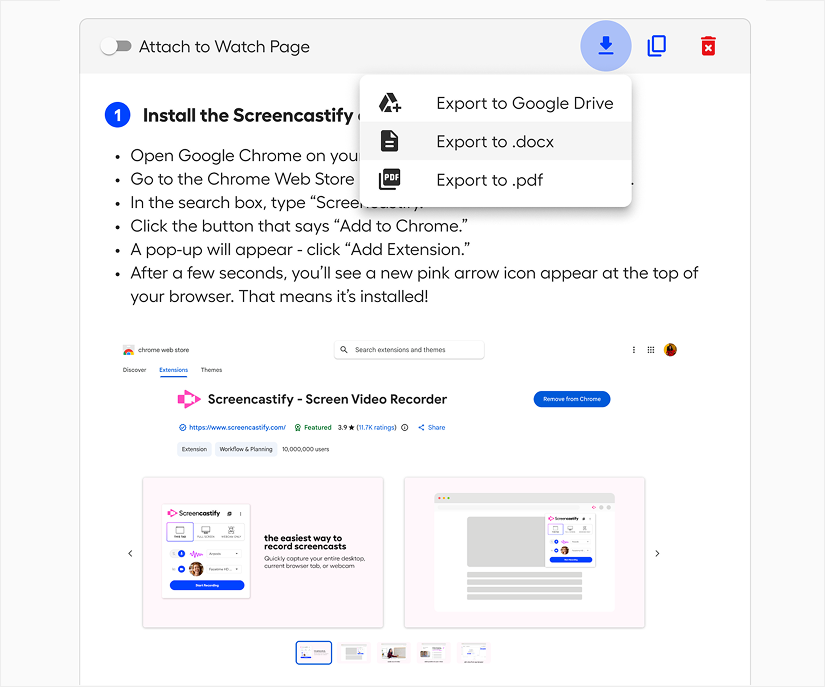
Share it anywhere. Export to Google Drive, .docx, or .pdf, or copy to clipboard.
Why do teams switch from Loom to Castify?
Teams switch for four features they use every week. None of them come with Loom.

Castify Submit gathers video responses from teammates, customers, or candidates in one place, with due dates and reviewers.

Due dates, comments, and video replies turn feedback into next steps, without a follow-up meeting.

AI voiceovers in 90+ languages and captions translated into 50+ give every team the same message.

Castify Transform turns any recording into a step-by-step SOP or guide your team can follow, in multiple languages.
How do I switch from Loom to Castify?
It takes a few minutes and three steps:
A plan matched to your Loom seats and contract
Help moving your video library
Onboarding for your team
Your first videos recorded and shared in minutes
How do Loom, Loom Business + AI, and Castify compare?
Loom is built for quick one-way video messages. Castify covers those and adds video collection, due dates, AI voiceovers, and video-to-doc. Loom details reflect its published plans as of October 2026.¹
In summary: Loom and Castify both record and share video. Castify adds video collection with due dates, AI voiceovers in 90+ languages, and Transform for SOPs. Castify Starter is $7 per user per month billed annually, versus $18 for Loom Business billed monthly, and both have a free plan.
Frequently asked questions

Loom is a video messaging tool: record your screen, share a link, and get reactions. Castify does that too, then covers the rest of the loop. Submit collects video responses from a single link with due dates. Comments and video replies keep feedback and next steps on the video. AI voiceovers reach teams in 90+ languages. Transform turns recordings into step-by-step docs.
Loom costs $18 per user per month for Business and $24 for Business + AI, billed monthly. Castify Starter is $7 per user per month billed annually ($18 billed monthly), and Pro, which adds AI captions, translations, voiceovers and the AI script generator, is $10 per user per month billed annually ($24 billed monthly). You can also start on the free plan with no credit card.
Yes. Castify's free plan is free forever and includes up to 10 videos, each up to 30 minutes. No credit card is required. Upgrade to Starter or Pro when you need more.
Yes. Share one Submit link, set a due date, and every response lands in one place. Add reviewers to watch and respond. Loom doesn't offer video collection.
Yes. Castify generates AI voiceovers in 90+ languages and translates captions into 50+, so one recording can reach a multilingual team.
Yes. Training and onboarding are among the most common uses on Castify work accounts. Set a due date, collect questions and feedback on the video, and see who has watched and responded.
[Confirm migration options: import support, link redirects, and help from the Castify team.] You can sign up for free and start recording on Castify today.
Yes. Castify is SOC 2 Type II certified and compliant with FERPA, COPPA, and CSPC.
Castify is the company and platform behind Screencastify. Screencastify is Castify's screen recorder; the platform also includes Castify Edit, Castify Transform, and Castify Submit.
Sources and methodology
1. Loom plans, limits, and prices from Loom’s published pricing page, checked October 2026. Castify plans and prices from castify.com/pricing.
2. Castify usage study of 10,700+ work videos.
Record your first video in minutes.
Up to 10 videos, 30 minutes each
No credit card required
Upgrade anytime for AI and Transform
Help Center and live support