A clearer recording experience in Castify Submit: Refreshed prompts, creator info, and an on-screen rubric
Product Updates
Nov 24, 2026
A clearer recording experience in Castify Submit: Refreshed prompts, creator info, and an on-screen rubric
Castify Submit's recording page now has a cleaner prompt, shows who's asking, and keeps the rubric open beside the instructions, so respondents record stronger videos.
Castify Submit lets you request videos from anyone. You set up a topic with a prompt, and often a rubric, and people record their responses. Whether you're screening candidates, certifying sales reps, or collecting customer stories, the quality of what you get back depends on how clear the request is.
We've updated the recording experience in Submit to make every request easier to understand and easier to answer well.
In short: The Submit prompt page has a cleaner design, shows the name and avatar of the person who created the topic, and opens the rubric in an expandable drawer so respondents can see it next to the instructions while they record.
What's new in the Castify Submit recording experience?
This update includes three improvements:
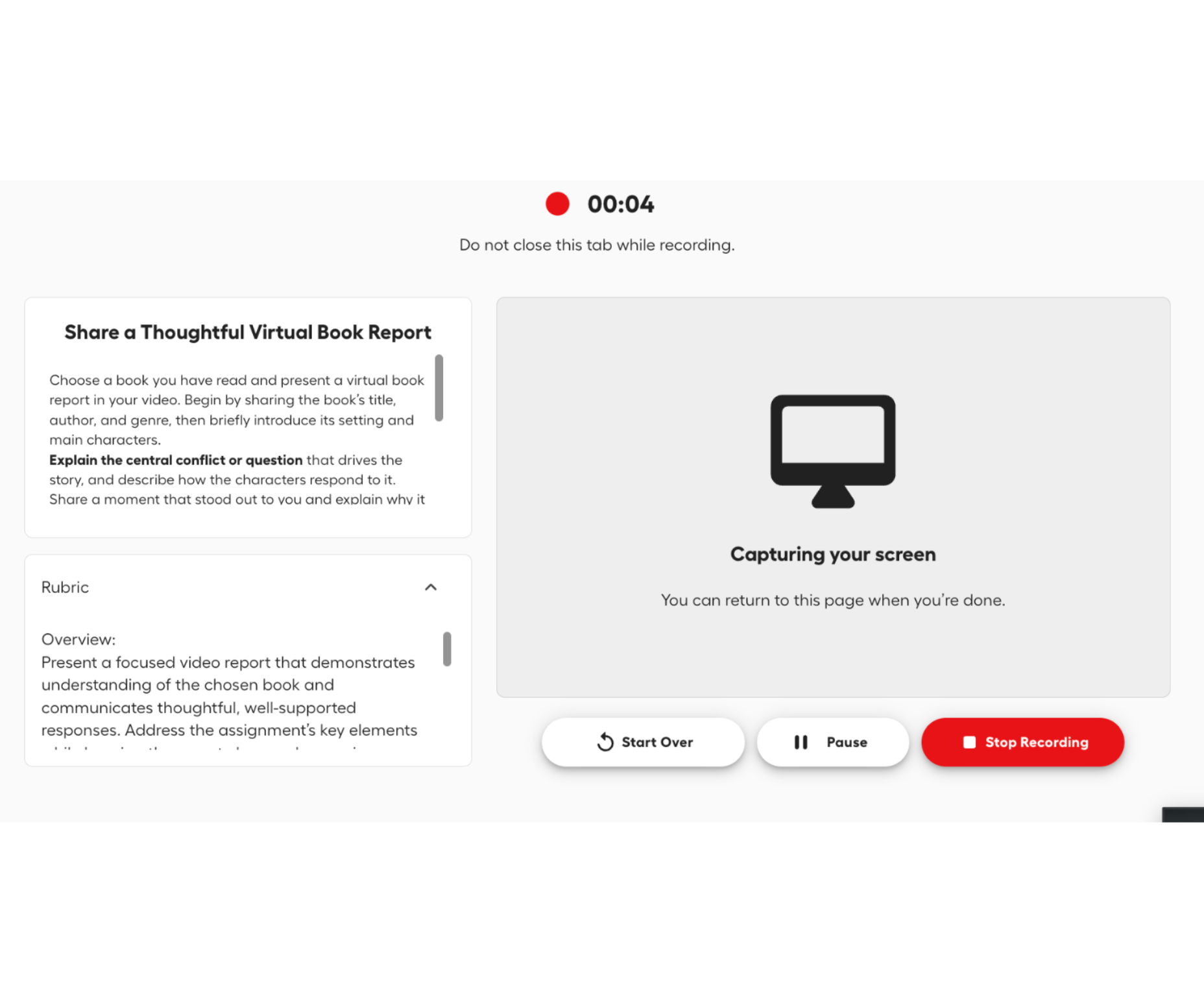
A refreshed prompt page. The prompt page has a cleaner design that's easier to read.
Creator info at a glance. The prompt page now shows the name and avatar of the person who created the topic.
A collapsible rubric. The rubric opens in an expandable drawer, so respondents can view it alongside the instructions while they record.
Why does showing the topic creator matter?
When someone opens a video request, the first question is often who it's from. Showing the creator's name and avatar answers that right away. A candidate can see that the request comes from the hiring manager, and a customer can see the name of the account manager who asked for their story. That context makes the request feel personal and trustworthy, and it helps people respond.
How does the rubric drawer help respondents?
A rubric tells respondents what a strong answer looks like. Before, it was harder to keep the rubric in view while recording. Now it opens in a drawer next to the instructions, so respondents can check the criteria while they record. Their responses are more likely to cover what you're looking for, which makes reviewing them faster.
How do business teams use Castify Submit?
These updates help any team that collects videos from other people. Some common examples:
Recruiting and HR: Send candidates a one-way video screening prompt. The rubric shows them what the hiring team will evaluate, and the creator info shows who they're talking to.
Sales enablement: Ask reps to record a pitch, demo, or objection-handling response for certification. The rubric keeps the scoring criteria in front of them while they record.
Learning and development: Have employees record a short skill demonstration or teach-back after a training session, so trainers can check understanding.
Customer and partner programs: Collect customer testimonials, product feedback, or partner updates. A clear prompt and a familiar name lead to better responses.
How do I get started?
There's nothing to set up. The new recording experience is live for every Castify Submit topic.
Create a Submit topic with your prompt.
Add a rubric if you want respondents to know how their videos will be evaluated.
Share the topic. Respondents will see the refreshed prompt page, your name and avatar, and the rubric drawer when they record.
Frequently asked questions
Do I need to update my existing Submit topics?
No. The refreshed prompt page applies to Submit topics automatically.
Can respondents see the rubric while they record?
Yes. The rubric opens in an expandable drawer next to the instructions, so respondents can keep it in view while they record.
What information about the topic creator is shown?
The prompt page shows the topic creator's name and avatar.
What can I use Castify Submit for?
Teams use Submit to collect videos from candidates, employees, customers, and partners, for example for screening interviews, sales certification, training check-ins, and customer stories.
Get better video responses
Clear requests lead to better answers. With a cleaner prompt page, visible creator info, and a rubric that stays in view, Castify Submit helps the people you ask record videos that give you what you need.
Want to see how Castify Submit can work for your team?Schedule a demo
Related Blog
Product Updates
November 20, 2026
Turn any captioned video into text: Download transcripts in Castify
Read more
Product Updates
November 18, 2026
Find any video in seconds: Introducing Global Search and the All view in Castify